Login with <sid>adm
Cmd:
Saplikey -get
Output:
HARDWARE KEY = **************
Dpmon - Dispatcher monitoring
Dpmon tool is use to check the status of work process or dispatcher queue @ operating system level without login to SAP GUI.
use cases:
1. To get the status of work process @ OS level, when the SAP GUI login is not possible.
Practical steps:
1.login to putty session using <sid>adm user.
2.To list down the available profiles, issue command- cdpro or (/sapmnt/<SID>/profile)
3.follow by command - ls
4.dpmon pf=<use_the_profile_used_for_application_server> - results shows dispatcher queue statistics.
5.type 'm' to display all the menu available for the dpmon.
6.type 'I' to display work process overview.
7.step 4,5,6 can be replace with command - dpmon m i
8.if all the work process are full take the PID of the work process and kill the process id with command- kill -9 <PID>
Red Hat for HANA 1.0

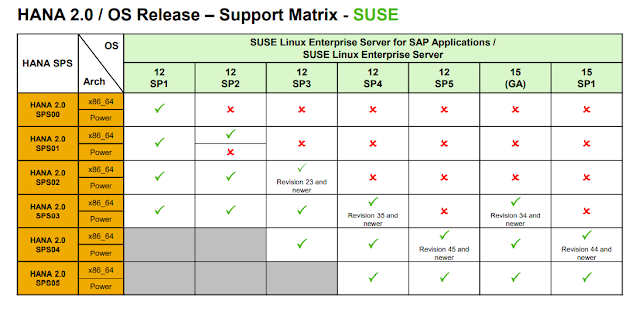
SUSE for HANA1.0


what is IO?
i/o (input /output) is the concept of writing or reading from the disk.
It is measured in the following aspect:


